Managing Orders
Under the Store > Orders menu in the administration menu, you will find a list of recent orders.
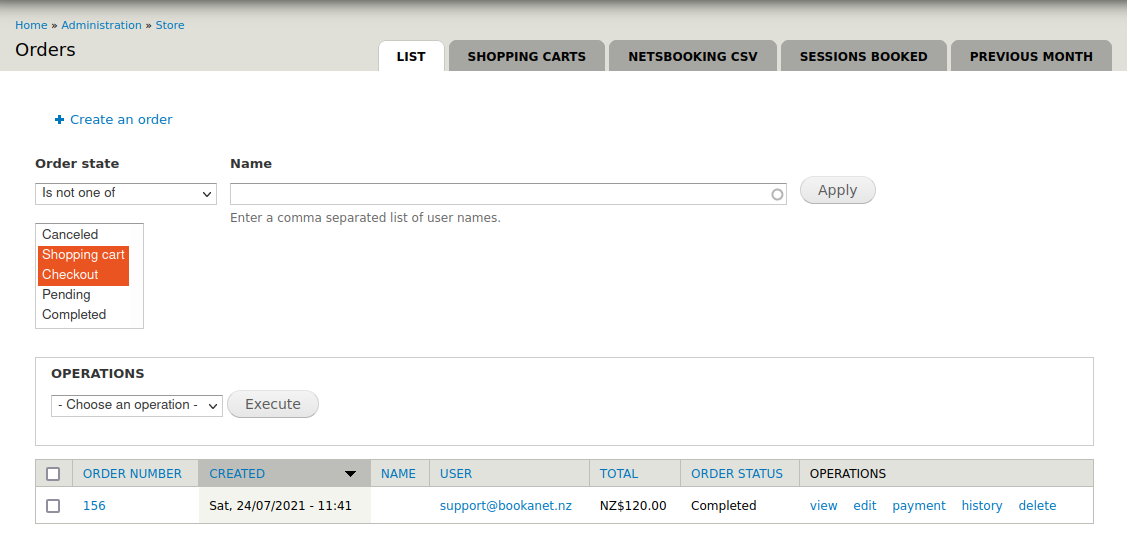
- For each order in the list, you can click through to view or edit the order details.
- You can use the form at the top of the page to filter orders.
Shown above at the top of the page are several tabs which provide access to additional information.
- Shopping carts will show orders which have not yet been completed. Orders wihch are abandoned will be automatically deleted from here after an idle period of about half an hour.
- Netsbooking CSV provides access to the data feed which is consumed by the access control system at the venue. This can be useful if you or the venue integrator need to inspect access codes relating to current bookings.
- Sessions booked provides a report of upcoming active booked sessions.
- Previous month provides a report of recent sessions.